Menu
Quick contact
[Company name]
[Address, Postal Code, City], Slovakia
We are not VAT registered
Mon–Fri: 9:00 AM – 5:00 PM
Payment details
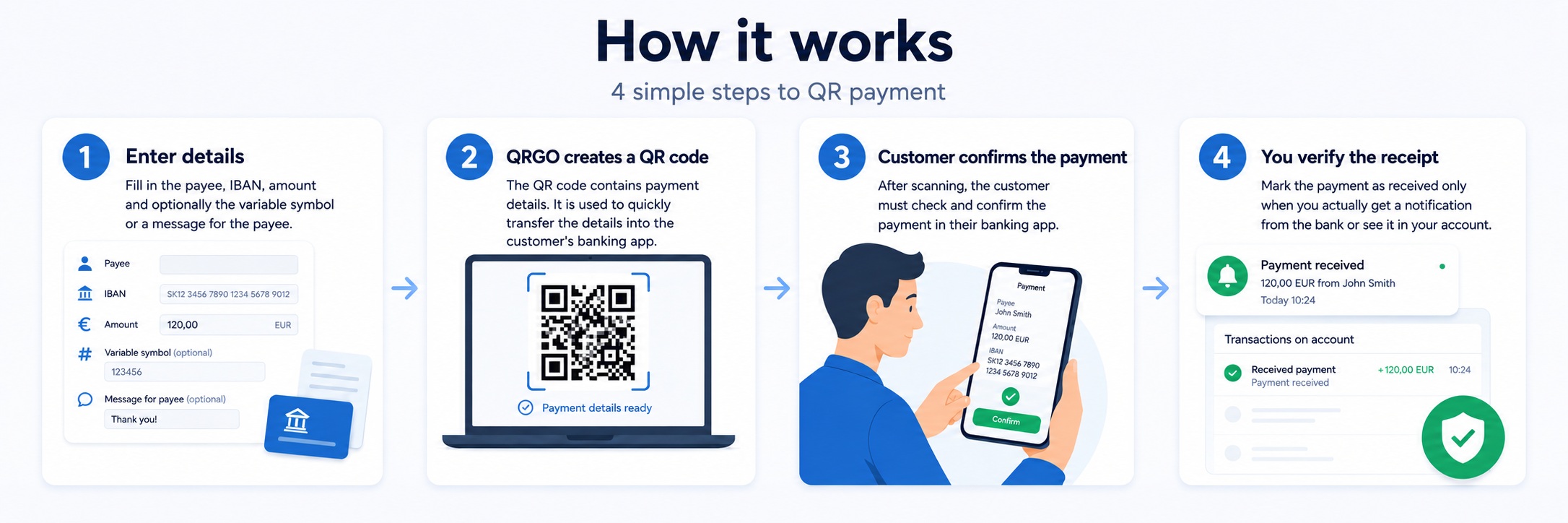
Fill in the details used to prepare the payment QR code.
Do you use QRGO often?
After registration, you can save your IBAN, business name and custom price list. The details will be filled in automatically for future payments.
Current payment
These are sample items for the demo.
No item has been added yet.
Total
0,00 €
By using the QR generator, you agree to the Terms and Conditions and Privacy Policy .
QR price list
Try the sample items. Your own QR price list is available after logging in.
Log in or create an account to use your own QR price list.
Payment QR code is ready
The customer can scan the QR code in their banking app.
The QR code could not be rendered. Payment details are shown below.
Ready
Amount
-
Payment details
- Recipient
- -
- IBAN
- -
- Variable symbol
- -
- Message
- -
- Note
- -
QRGO demo
Quick payment
Generate a payment QR code in seconds. Enter a one-time amount or choose items from your own price list.
2009 - 2026
Copyright © This website is generated by the Skeletio system by
Joto.sk
[Skeletio.com]
All rights to the content are reserved for the website operator and content owner of QRGO.SK